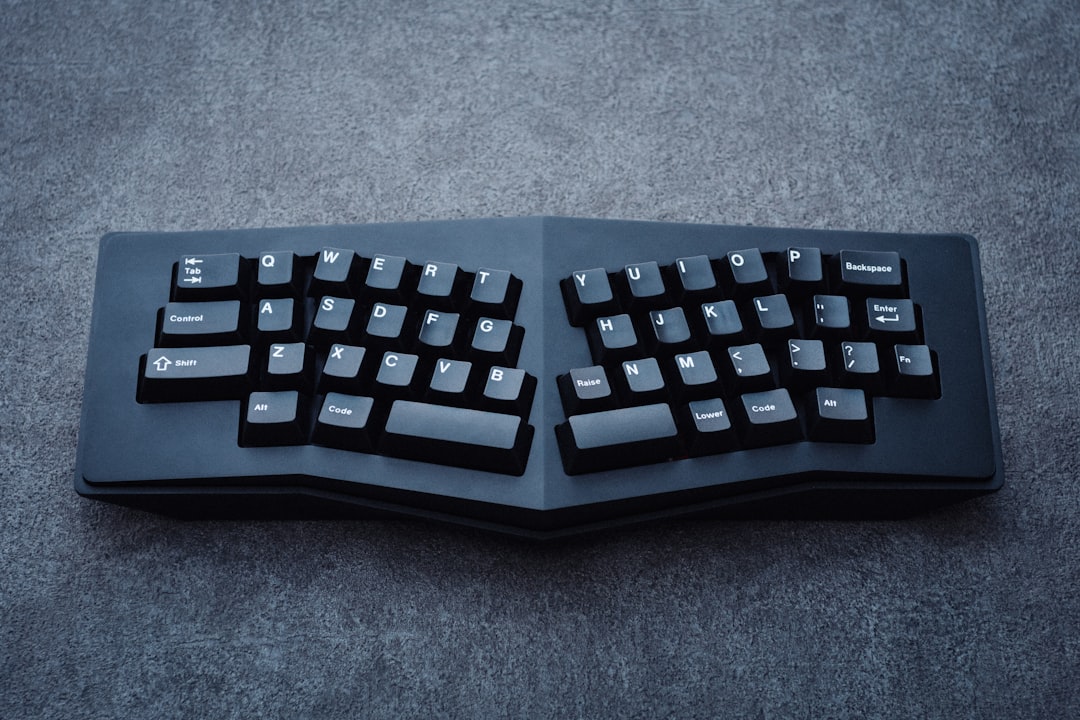
Why Split Keyboards Are a Game-Changer for Remote Workers in 2026
If you’ve been grinding away at a traditional keyboard for hours each day, your body is probably sending you some not-so-subtle signals. Neck tension, shoulder tightness, wrist aches — these are the hallmark complaints of home office workers who haven’t yet made the switch to an ergonomic setup. Split keyboards are specifically designed to address these issues by allowing your hands to rest at a more natural, shoulder-width position, dramatically reducing the internal rotation of your arms and the strain on your wrists, forearms, and upper back.
For remote workers in the US, the home office has become a permanent fixture — and so have the repetitive stress injuries that come with poorly designed workstations. The good news? The ergonomic keyboard market has exploded with innovation heading into 2026, offering everything from beginner-friendly split designs to fully programmable, tented mechanical keyboards that feel like they were custom-built for your hands. Whether you’re a software developer clocking 10-hour coding sessions or a content creator writing thousands of words per day, there’s a split keyboard on this list that will transform the way you work.
We’ve tested and researched the top options available right now to bring you the five best split keyboards for back pain relief in 2026. Each pick has been evaluated for ergonomic benefit, build quality, typing feel, wireless capability, and overall value. We’ve also included a comprehensive buyer’s guide at the bottom so you know exactly what to look for before you invest. Let’s dive in.
Our Top 5 Split Keyboards for Back Pain Relief in 2026
1. Kinesis Advantage360 Pro — Best Overall Split Keyboard
The Kinesis Advantage360 Pro is widely regarded as the gold standard in ergonomic split keyboards, and for good reason. Its deeply contoured key wells cradle your fingers naturally, reducing the need to stretch or splay your hands. The two independent halves can be positioned exactly as wide as your shoulders demand, and the built-in tenting angle keeps your wrists in a neutral, handshake-like position that dramatically reduces pronation — one of the leading causes of repetitive strain injury.
- Pro: Deep dish key wells dramatically reduce finger travel and wrist extension
- Pro: Fully programmable via ZMK firmware with onboard memory
- Pro: Wireless Bluetooth connectivity with up to 6 months battery life per charge
- Pro: Compatible with Windows, macOS, and Linux out of the box
- Pro: Premium Cherry MX or Kailh switch options for customized typing feel
- Con: Steep learning curve — expect 2 to 4 weeks to reach full typing speed
- Con: Premium price point puts it out of reach for budget shoppers
- Con: Bulky footprint takes up significant desk real estate
Price: $449.00 | Rating: Rated 4.6 stars by verified users on Amazon
Best for: Power users, developers, and anyone with serious wrist or shoulder pain who wants the most ergonomically advanced split keyboard on the market.
2. Logitech Ergo K860 — Best Split Keyboard for Beginners
The Logitech Ergo K860 is the perfect entry point for home office workers who are curious about ergonomic keyboards but aren’t ready to commit to a steep learning curve. Unlike fully separated split keyboards, the K860 features a one-piece split design with a gentle wave curve and a built-in palm rest — making the transition from a traditional keyboard feel natural and approachable. Logitech’s reputation for reliability shines through here, and the wireless performance is rock solid.
- Pro: Gentle split curve is immediately comfortable with almost no adjustment period
- Pro: Integrated cushioned palm rest reduces wrist extension right out of the box
- Pro: Connects to up to 3 devices via Bluetooth or Logitech Unifying Receiver
- Pro: Excellent battery life — up to 2 years on a single AA battery set
- Con: One-piece design limits how wide you can spread the two halves
- Con: Membrane key switches feel mushy compared to mechanical alternatives
- Con: No tenting option limits wrist pronation relief
Price: $129.99 | Rating: Rated 4.4 stars by over 18,000 verified Amazon reviewers
Best for: Remote workers new to ergonomic keyboards who want immediate comfort improvements without a dramatic learning curve or a high price tag.
3. Dygma Defy — Best Wireless Fully Split Mechanical Keyboard
The Dygma Defy burst onto the scene as one of the most hotly anticipated ergonomic keyboards in recent memory, and it delivers on nearly every promise. Fully wireless, infinitely tiltable, and built with hot-swappable mechanical switches, the Defy is a powerhouse for serious typists who refuse to compromise on either ergonomics or performance. Its compact layout encourages thumb cluster use, which offloads work from your weaker pinky fingers and reduces overall hand strain.
- Pro: True wireless split halves with no connecting cable between them
- Pro: Hot-swappable switches let you customize typing feel without soldering
- Pro: Adjustable tenting legs provide up to 50 degrees of tilt for wrist neutrality
- Pro: Bazecor software offers deep key remapping and layer customization
- Pro: RGB backlighting with per-key control for aesthetics and layer visualization
- Con: Compact layout requires relearning key positions for number row and function keys
- Con: Software configuration can feel complex for non-technical users
Price: $329.00 | Rating: Rated 4.5 stars by enthusiast community reviewers
Best for: Tech-savvy remote workers and developers who want a fully wireless, highly customizable split keyboard with serious ergonomic tenting capability.
4. Microsoft Sculpt Ergonomic Keyboard — Best Budget-Friendly Split Keyboard
Don’t let the affordable price fool you — the Microsoft Sculpt Ergonomic Keyboard is a genuinely well-designed ergonomic tool that has helped thousands of US office workers reduce wrist and shoulder discomfort. Its split key layout and cushioned palm rest are thoughtfully engineered, and the domed shape naturally encourages a more neutral wrist position. It’s not as customizable as the premium picks above, but for everyday productivity tasks, it punches well above its weight class.
- Pro: Affordable price makes ergonomic typing accessible to everyone
- Pro: Domed, split key layout encourages natural wrist and forearm positioning
- Pro: Wireless 2.4GHz USB dongle connection is lag-free and reliable
- Pro: Separate number pad included, reducing mouse reach distance
- Con: Halves cannot be separated — fixed split position may not suit all shoulder widths
- Con: Membrane switches offer limited tactile feedback for fast typists
- Con: No Bluetooth — requires a USB port for the wireless dongle
Price: $59.99 | Rating: Rated 4.3 stars by over 22,000 Amazon reviewers
Best for: Budget-conscious home office workers who want a meaningful ergonomic upgrade from a flat keyboard without spending more than $60.
5. ZSA Moonlander Mark I — Best for Customization and Programmability
The ZSA Moonlander Mark I is a cult favorite among keyboard enthusiasts and ergonomics-obsessed remote workers alike. Its modular, foldable design makes it surprisingly portable for a fully split mechanical keyboard, and the adjustable thumb clusters can be angled to match your unique hand anatomy. What really sets the Moonlander apart is ZSA’s Oryx configurator — a browser-based tool that makes building custom key layouts and layers surprisingly intuitive, even for non-programmers.
- Pro: Highly adjustable tenting and thumb cluster angles for personalized ergonomics
- Pro: Oryx web configurator makes layout customization beginner-friendly
- Pro: Hot-swappable switches with a wide range of Cherry, Gateron, and Kailh options
- Pro: Compact and foldable — relatively portable for a split mechanical keyboard
- Pro: Strong community support with hundreds of shared layout configurations
- Con: Wired only — no wireless option available
- Con: Higher price point requires commitment to the ergonomic keyboard lifestyle
- Con: Columnar stagger layout requires a significant adjustment period for QWERTY typists
Price: $365.00 | Rating: Rated 4.7 stars by the mechanical keyboard community
Best for: Keyboard enthusiasts, programmers, and remote workers who want maximum customization and are willing to invest time in learning a new layout for long-term ergonomic benefits.
Buyer’s Guide: How to Choose the Best Split Keyboard for Back Pain Relief
With so many options on the market, it can feel overwhelming to pick the right split keyboard for your needs. Here are the key factors every US home office worker should consider before making a purchase:
1. Fully Split vs. One-Piece Split Design
A fully split keyboard consists of two completely independent halves that you can position as far apart as you like — ideal for broader-shouldered users or anyone who wants maximum flexibility. A one-piece split keyboard (like the Logitech K860) has a fixed split angle built into a single unit. One-piece designs have a much gentler learning curve and are better for beginners, while fully split designs offer superior ergonomic potential for experienced users.
2. Tenting Capability
Tenting refers to raising the inner edges of the keyboard halves so your wrists rotate into a more natural, handshake-like position. This dramatically reduces forearm pronation, which is a leading cause of repetitive strain injuries. If back and shoulder pain is your primary concern, prioritize keyboards with adjustable tenting legs. Look for models that offer at least 15 to 20 degrees of tilt for meaningful relief.
3. Switch Type: Mechanical vs. Membrane
Mechanical switches provide tactile or audible feedback with each keystroke, which reduces the force most people unconsciously apply when typing on flat membrane keyboards. This reduction in bottoming-out force is a significant factor in reducing finger, wrist, and arm fatigue over long sessions. Budget keyboards typically use membrane switches, which are quieter but offer less ergonomic feedback. If you type for more than four hours a day, mechanical switches are worth the investment.
4. Wireless vs. Wired
A wireless split keyboard eliminates cable clutter and allows you to position each half freely without being constrained by a connecting cable. This is especially important for tented setups where cables can interfere with the angle. However, wired keyboards offer zero latency and never need charging — a practical consideration for users who don’t want to manage battery life.
5. Learning Curve and Layout
Many split keyboards, particularly those with columnar stagger layouts (where keys are arranged in straight columns rather than the traditional offset QWERTY rows), require a significant adjustment period. Expect one to four weeks before you return to your previous typing speed. If you need to maintain productivity immediately, choose a keyboard with a standard staggered layout like the Logitech K860 or Microsoft Sculpt.
6. Palm Rest and Wrist Support
An integrated or included palm rest helps keep your wrists in a neutral position and reduces the angle of extension that strains tendons over time. Some keyboards include cushioned palm rests; others require a separate purchase. If back and shoulder pain is your primary complaint, also consider a keyboard tray that allows you to position the keyboard below desk height, keeping your elbows at a 90-degree angle.
7. Budget Considerations
Split keyboards range from under $60 to over $450. As a general rule, you get what you pay for in terms of build quality, switch options, and ergonomic adjustability. However, even a $60 ergonomic keyboard is a significant upgrade over a flat, standard keyboard. Start with your budget and find the best ergonomic features available within it — any improvement is better than none.
Conclusion: Invest in Your Health, Invest in the Right Keyboard
Back pain, shoulder tension, and wrist discomfort are not inevitable consequences of remote work — they’re the result of tools that weren’t designed with your body in mind. The split keyboards on this list represent the best the market has to offer in 2026, and each one has the potential to meaningfully reduce the physical toll of long hours at your desk.
Our top overall pick remains the Kinesis Advantage360 Pro for its unmatched ergonomic design, wireless freedom, and deep programmability. Yes, it’s a significant investment — but if you’re serious about eliminating back and wrist pain for the long haul, it’s the keyboard that delivers the most comprehensive solution. Your body will thank you within the first week.
Ready to make the switch? Check the current price of the Kinesis Advantage360 Pro on Amazon and take the first step toward a more comfortable, pain-free workday in 2026.
Disclaimer: This article contains affiliate links. If you purchase through our links, BestHomeOfficeAI.com may earn a small commission at no additional cost to you. All recommendations are based on research and editorial judgment. Product information should be verified before purchase.